【翻译】Handling UIKit gestures 处理 UIkit 的 gesture
——使用Gesture Recognizer来简化Touch处理和打造统一的用户体验文档原文地址
概述
Gesture Recognizer是处理点击和长按事件的最简单方法,你可以把一个或者几个Gesture Recognizer附加到任何view上,它封装了处理和解释事件的所有逻辑,并把它们匹配到已知的模式。当检测到匹配,Gesture Recognizer会通知特定对象,这个对象可以是view controller, view 本身,或者App中的其他对象。
Gesture Recognizer用 target-action模式来发送通知。当一个
UITapGestureRecognizer对象检测到view中的单指点击时,它会调用这个 view 的 view controller 里的action 函数。
译者注:这里的 action 函数指在Gesture Recognizer 在创建时就定义好的、一旦触发就去调用的方法。下同。
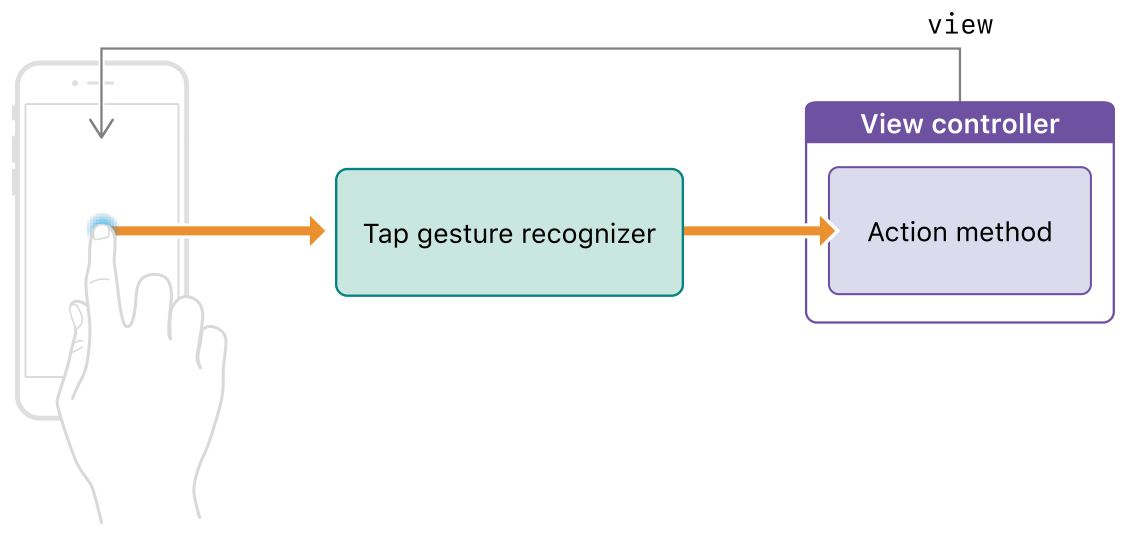
Gesture recognizer 有两种:离散的和连续的
离散的Gesture recognizer在检测到手势后仅仅调用一次action 函数。
而对于连续的Gesture Recognize,在(手势)满足识别标准后,它会调用 action 方法很多次,只要手势事件里的信息有改变就会通知你。比如,一个UIPanGestureRecognizer对象会在每一次「触碰位置」改变时调用action 函数。
Interface Builder 包含每一种标准的 UIKit Gesture Recognizer对象,它还包含了自定义的Gesture Recognizer,你可以用这个来代表你自己的Gesture Recognizer子类
后半句我也没看懂,原文如下:
It also includes a custom gesture recognizer object that you can use to represent your customUIGestureRecognizersubclasses.
配置一个Gesture Recognizer
步骤:
- 在storyboard中,拖一个Gesture Recognizer到你的 VIew 上
- 实现对应的 action 函数。查看接下来的代码
- 将你的 action函数连到那个Gesture Recognizer
你可以在Interface Builder创建这个连接,只需要右击Gesture Recognizer和连接它的Sent Action selector 到你接口中的合适对象。你也可以用纯代码的方式——addTarget:action:。
以下代码展示了一个Gesture Recognizer的 action 函数,它的一般形式:
- (IBAction)myActionMethod:(UIGestureRecognizer*)sender
响应手势
action 函数提供了你的 App 对手势的反应。对于离散的Gesture Recognizer,你的 action 函数会跟 UIButton的 action 函数差不多。一旦 action 函数执行,你就执行合理的任务。
而对于连续的Gesture Recognizer,你的 action 函数可以响应手势识别后,也可以在识别成功前跟踪事件。跟踪事件能够创造更有互动性的体验。例如,你可以UIPanGestureRecognizer对象里的「信息更新」来移动你App 里的内容。
Gesture Recognizer的state属性,能告诉我们对象当前的识别状态。连续的Gesture Recognizer的 state 属性,取值范围是UIGestureRecognizerStateBegan (开始)、 UIGestureRecognizerStateChanged (改变)、 UIGestureRecognizerStateEnded(结束),还有 UIGestureRecognizerStateCancelled.(取消)。你可以在 action 函数里根据这个 state 来做操作。举个例子,你可以用「开始」「改变」两个state 来对内容做一些临时的改变,用「结束」state 来使「改变」成效。
在进行任何操作之前,永远都要先检查 state 的值。
如何处理特定的手势,以下链接给出了一些例子:
- Handling tap gestures点击
- Handling long-press gestures长按
- Handling pan gestures平移(各个方向)
- Handling swipe gestures滑动(单个方向)
- Handling pinch gestures捏合
- Handling rotation gestures旋转
如果要了解更多有关 Gesture Recognizer state相关信息以及它们如何影响你的代码,请看实现一个自定义的手势识别器。
总结:本文介绍了 Gesture Recognizer 的工作模式、有哪两种 Gesture Recognizer 、 如何配置Gesture Recognizer 以及 Gesture Recognizer 的 state 属性。